AVIF vs WebP: Which Next-Gen Image Format Should You Actually Use?
By Khanh Nguyen
If you've ever tried to make a website faster, you've hit the same nagging question. Your images are the heaviest thing on the page, everyone tells you to switch to a "next-gen format," and the two names that come up are AVIF and WebP. So which one wins?
Here's the short version: both beat JPEG and PNG by a wide margin, and neither is a wrong answer. AVIF squeezes files smaller; WebP has been around longer and works absolutely everywhere. The rest of this guide unpacks the trade-offs under those two sentences — and, at the end, how to convert a whole folder of images to either format without any of your pictures ever leaving your device.
First, what are these two formats?
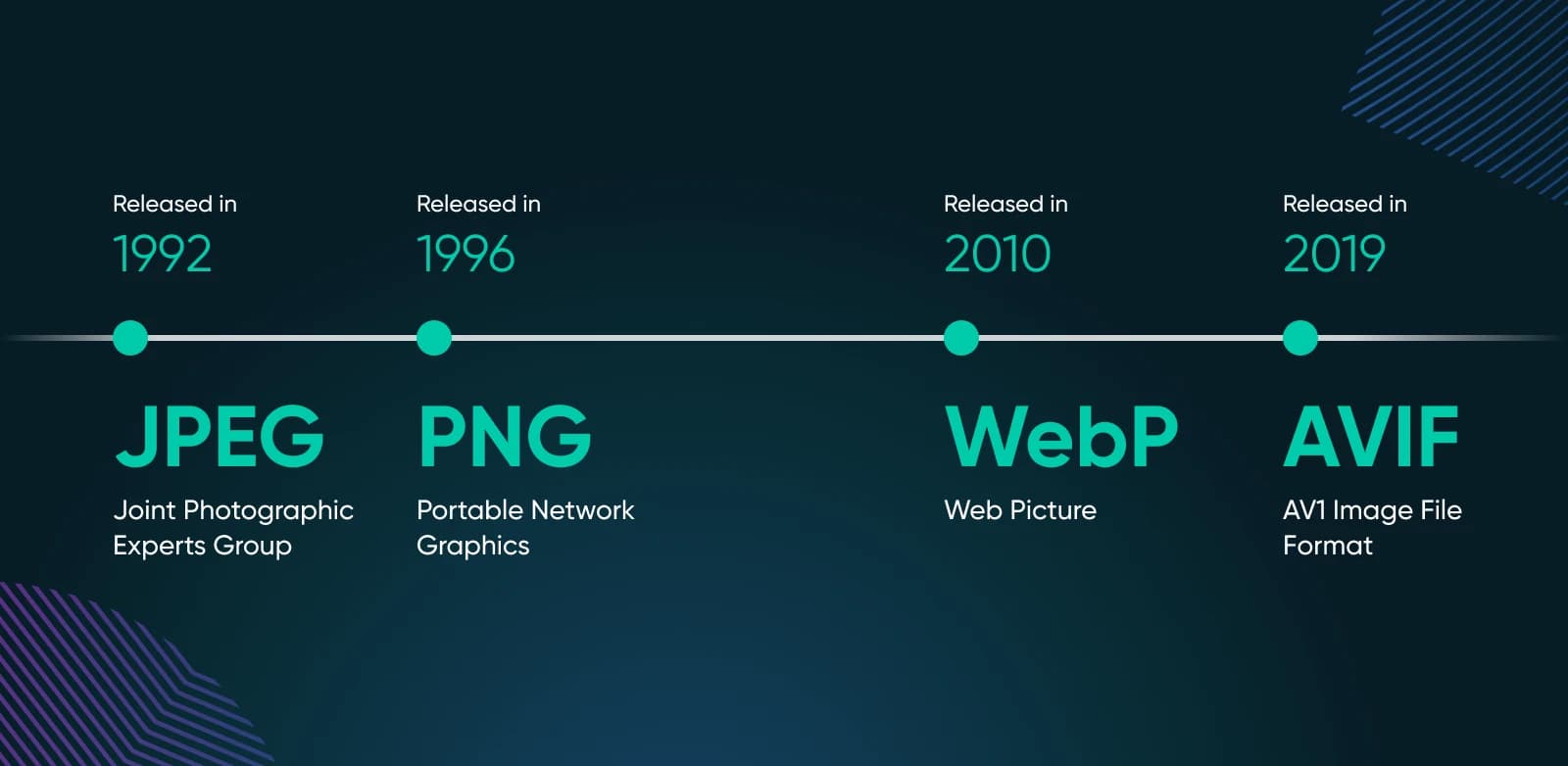
WebP is the older of the pair. Google introduced it back in 2010, built on the VP8 video codec, as a single format that could replace both JPEG (for photos) and PNG (for graphics with transparency). It handles lossy and lossless compression, supports an alpha channel for transparent backgrounds, and can even do animation. After more than a decade in the wild, it's the safe, boring, reliable choice — and I mean that as a compliment.
AVIF is the newcomer. It landed in 2019 from the Alliance for Open Media, the same group behind the AV1 video codec, and it's essentially a still frame of AV1 wrapped in an image container. Being newer and based on far more advanced compression, it does more with every byte: smaller files, richer color, and support for HDR and 10- or 12-bit color depth that WebP simply can't touch.
Think of it this way. WebP was designed to be a better JPEG. AVIF was designed to be better than that.
The differences that actually matter
Compression and file size
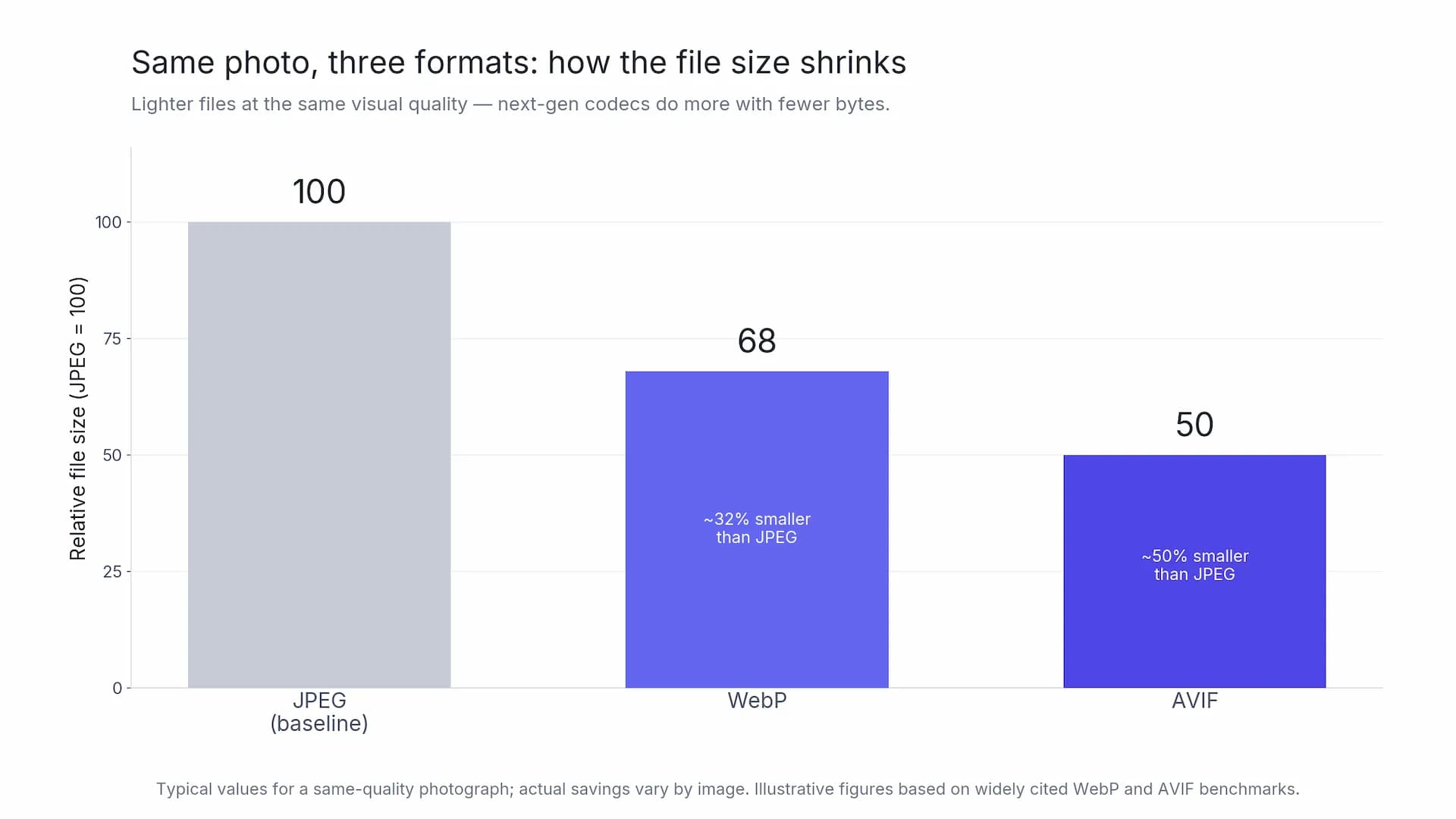
This is the headline, so let's get it out of the way. For a typical photograph at the same visual quality, WebP tends to come in around 25–34% smaller than the equivalent JPEG. AVIF goes further — roughly half the size of that JPEG, and usually another 20–30% smaller than the WebP version on top of that.
Those numbers aren't gospel. Compression is stubbornly image-dependent: a flat graphic behaves nothing like a noisy, detailed photo, and now and then you'll find an image where the two land almost on top of each other. But as a rule of thumb, if your goal is "as small as physically possible," AVIF gets you there.
Image quality and color
AVIF's advantage isn't only about size — it's about what it can hold. Because it supports higher bit depths and a wider color gamut, it keeps gradients smooth where an 8-bit format starts to show visible banding, and it can carry HDR detail. If you work with rich, moody photography — skies, skin tones, sunsets, anything with subtle transitions — AVIF protects that detail at file sizes WebP can't match.
WebP is capped at 8-bit color. For the vast majority of web graphics, logos, screenshots, and everyday product shots, you will never notice, and that's the point. It's more than good enough for most of what actually goes on a web page.
Transparency and animation
Both formats support transparent backgrounds, so either one can replace a heavy PNG logo. Both can also do animation, which makes them candidates for replacing clunky animated GIFs. WebP has the longer track record here; AVIF's animation support is real but younger. For a plain transparent graphic, though, either format will shrink that PNG dramatically.
Browser support
For years this was AVIF's weak spot, and it's the reason a lot of older tutorials still tell you to play it safe with WebP. That advice is out of date.
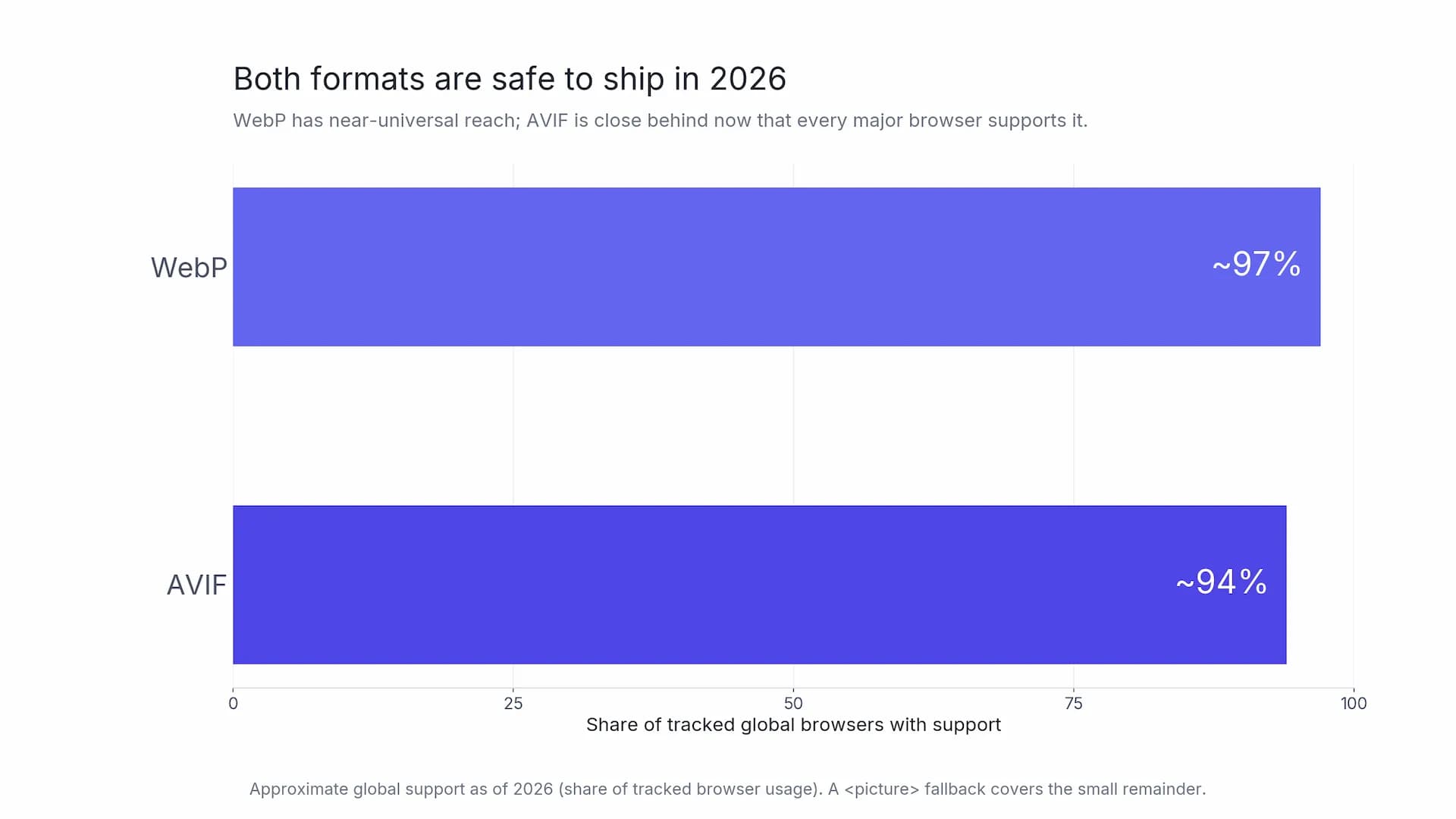
WebP is supported by essentially every browser in use today — comfortably around 97% of global traffic. AVIF has closed most of the gap: every major engine now decodes it, including Safari (which added support in version 16.4). Global support sits in the mid-90s and keeps climbing. The handful of stragglers are old browser versions that are fading out on their own.
The practical takeaway: in 2026, both are safe to ship. And there's a clean pattern that removes the risk entirely — more on that in a second.
Encoding speed
One honest mark against AVIF: it's more work to create. Squeezing a file that hard takes more CPU, so encoding an AVIF can be noticeably slower than a WebP, especially at the highest quality settings. On a single image you won't care. On a batch of a few hundred product photos, it's worth knowing that AVIF will take a little longer to grind through. Decoding — what your visitors' browsers do — is fast enough either way.
Side-by-side, at a glance
| WebP | AVIF | |
|---|---|---|
| Released | 2010 (Google) | 2019 (Alliance for Open Media) |
| Based on | VP8 | AV1 |
| Typical size vs JPEG | ~25–34% smaller | ~50% smaller |
| Size vs WebP | — | ~20–30% smaller again |
| Color depth | 8-bit | up to 10/12-bit, HDR |
| Transparency | Yes | Yes |
| Animation | Yes (mature) | Yes (newer) |
| Browser support (2026) | ~97% | ~94% |
| Encoding speed | Fast | Slower |
| Best at | Universal, everyday web images | Smallest files, rich photography |
So which one should you pick?
Honestly? You don't have to pick, and the best answer is often "both." Modern HTML lets you offer AVIF first and quietly fall back to WebP (and then JPEG) for anything that can't read it, using a <picture> element with multiple <source> tags. The browser grabs the first format it understands, every visitor gets a light image, and nobody sees a broken picture. That's the closest thing to a free lunch in image optimization.
If you'd rather keep it simple and ship one format, here's the quick decision:
- Reach for AVIF when file size is everything and you're serving photo-heavy pages — a portfolio, a travel blog, a product gallery full of detailed shots.
- Reach for WebP when you want a no-drama, drop-in replacement for your JPEGs and PNGs across a whole site, especially graphics, icons, and UI. It's the lowest-risk upgrade you can make.
Either way, you're leaving JPEG behind, and that's the win that matters.
Why this shows up in your PageSpeed report
None of this is academic. Images are the heaviest part of most web pages, and Google's PageSpeed Insights flags them directly — that "Serve images in next-gen formats" warning is asking for exactly what we've been discussing. Lighter images mean a faster Largest Contentful Paint, one of the Core Web Vitals that shapes how your pages rank and how fast they feel on real phones. Shaving hundreds of kilobytes off a hero image is one of the highest-leverage speed fixes there is.
How to convert your images to WebP or AVIF
Here's the part most comparisons skip. Knowing AVIF is smaller doesn't help if converting a folder of 40 photos is a chore. This is where Image Optimizer comes in — a free, browser-based tool that compresses, resizes, and converts images in bulk, with the kind of compression quality you'd expect from a desktop app, right in a browser tab.
What makes it different: everything runs client-side. Your images are processed right in your browser and never leave your device — there's no add-to-a-server step, and you can verify it yourself in your browser's DevTools network tab.
The whole thing is three steps.
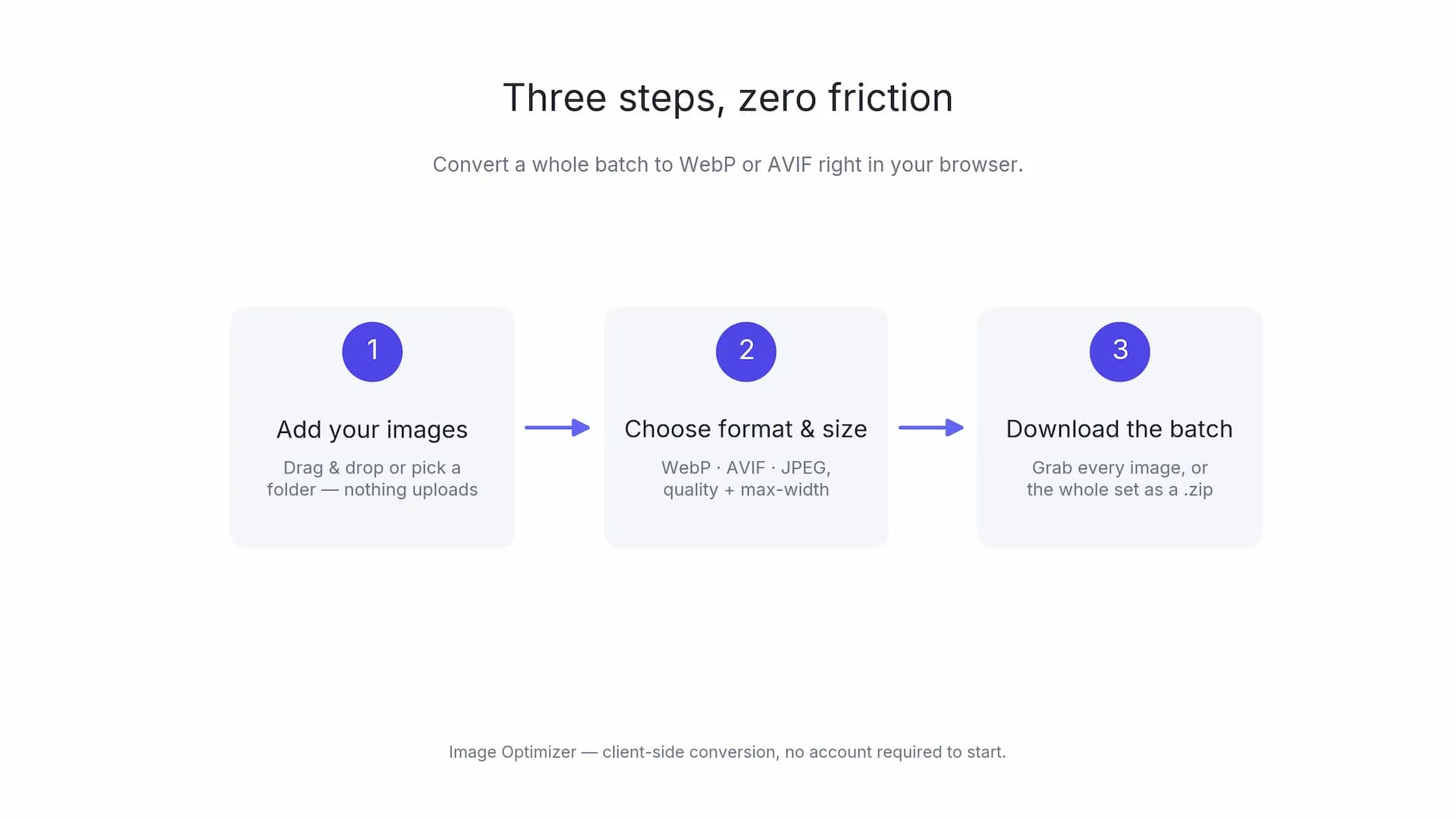
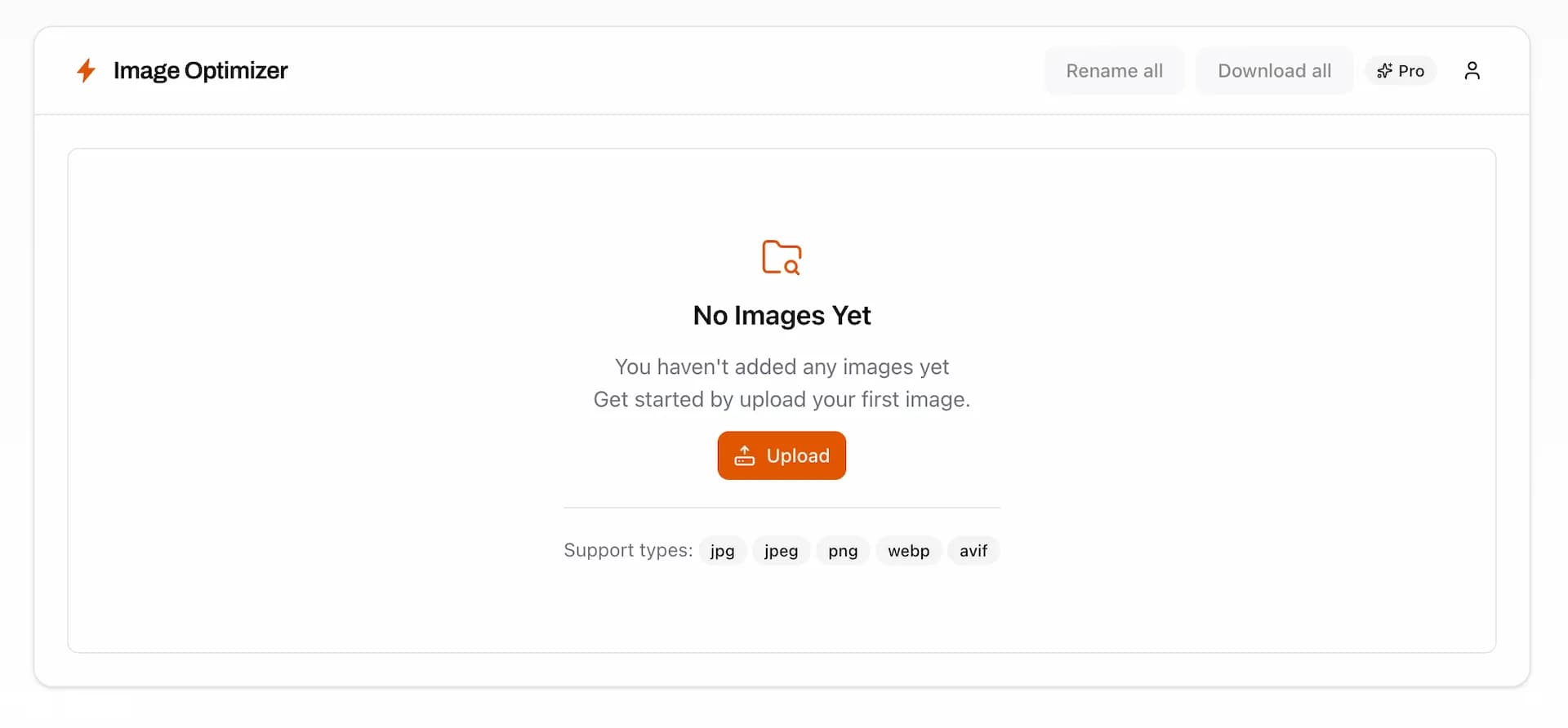
Step 1 — Add your images. Drag a batch straight onto the page or pick them from a folder. The free tier handles up to 10 images per batch, which is plenty to test the workflow on real files.
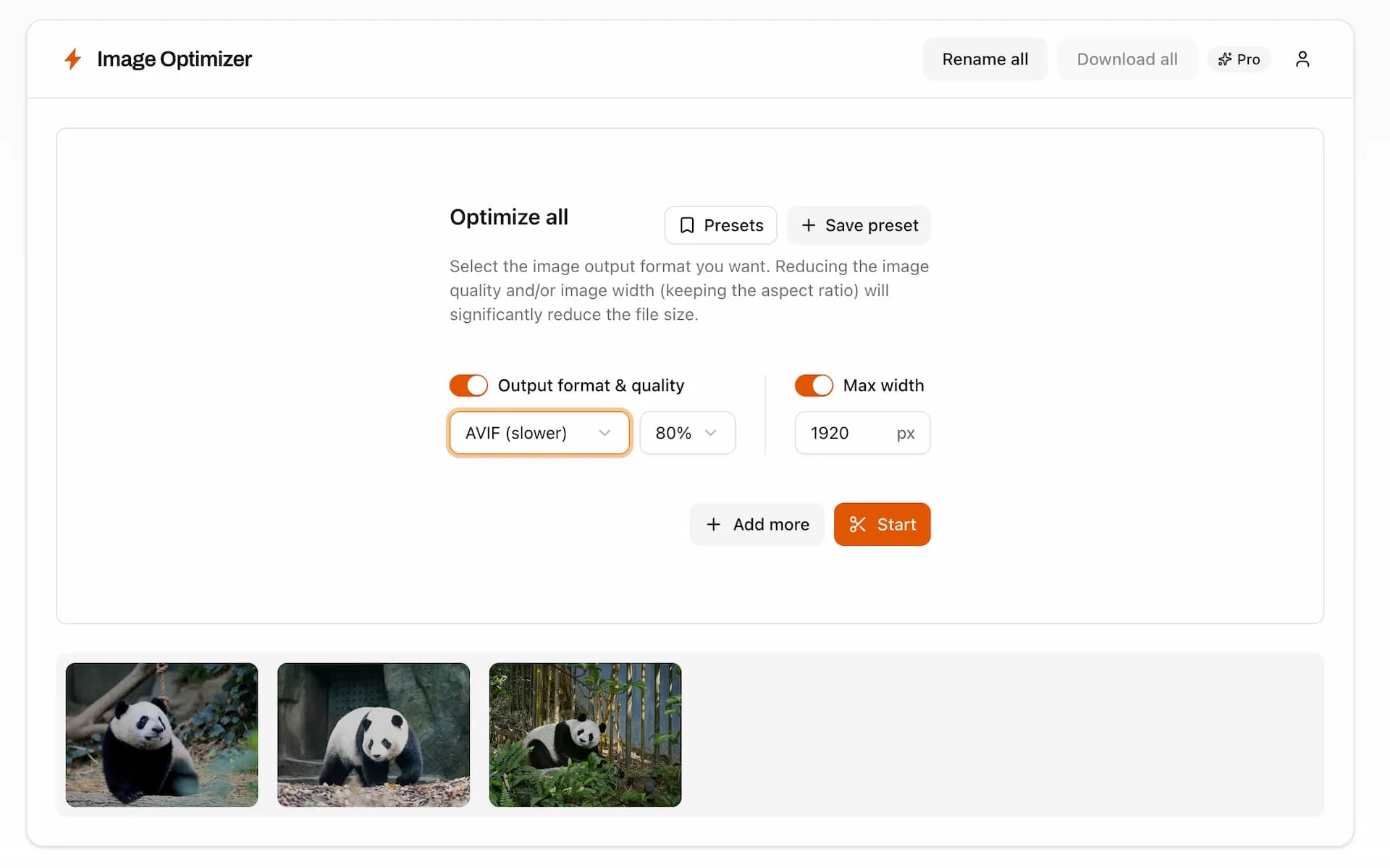
Step 2 — Choose your format and size. Set the output to WebP (free) or AVIF (a Pro feature), nudge the quality slider until the size-versus-sharpness balance looks right, and optionally set a maximum width so oversized photos get scaled down to web-ready dimensions. Note that it only downscales — it will never blow an image up past its real resolution and soften it.
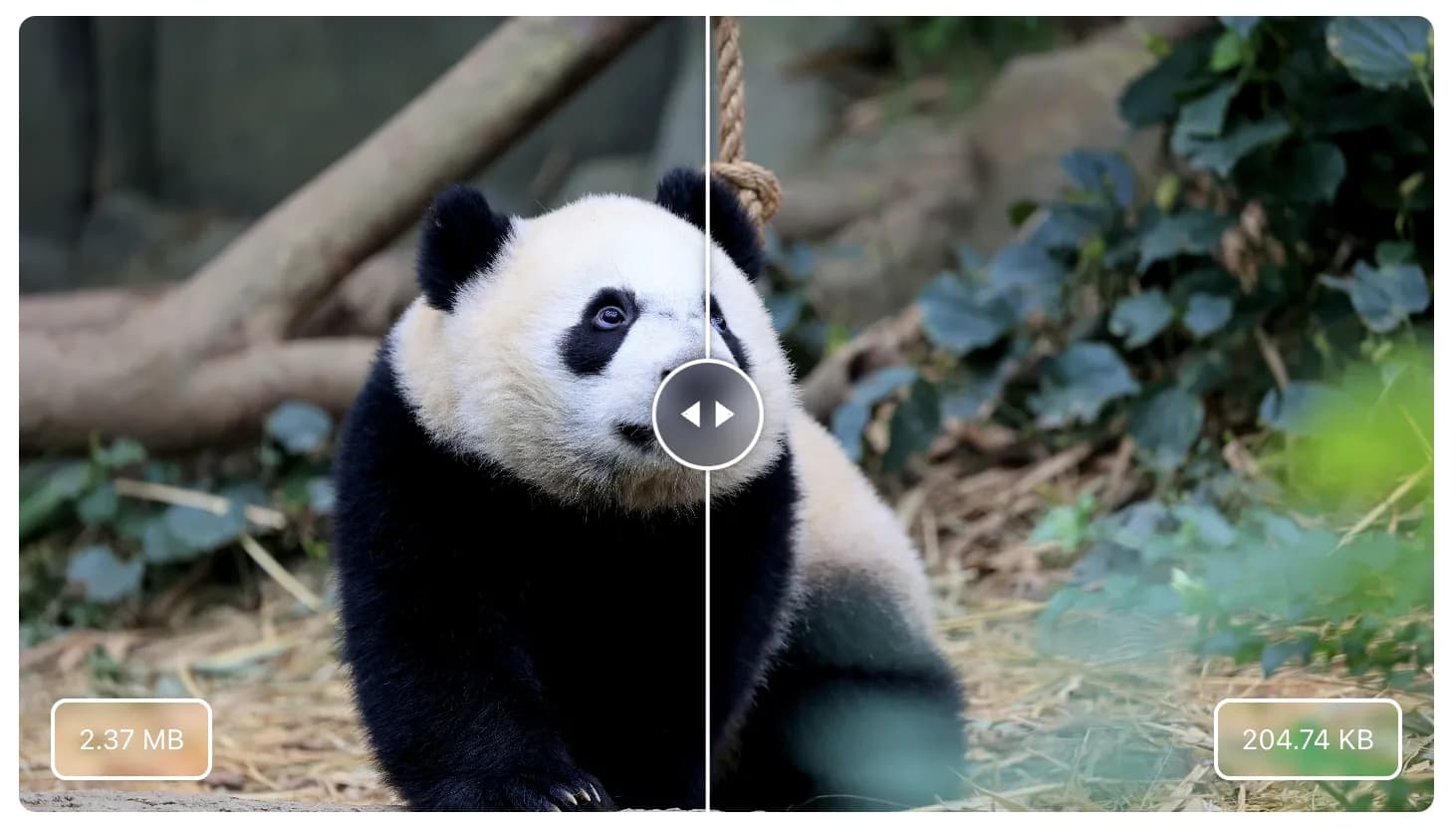
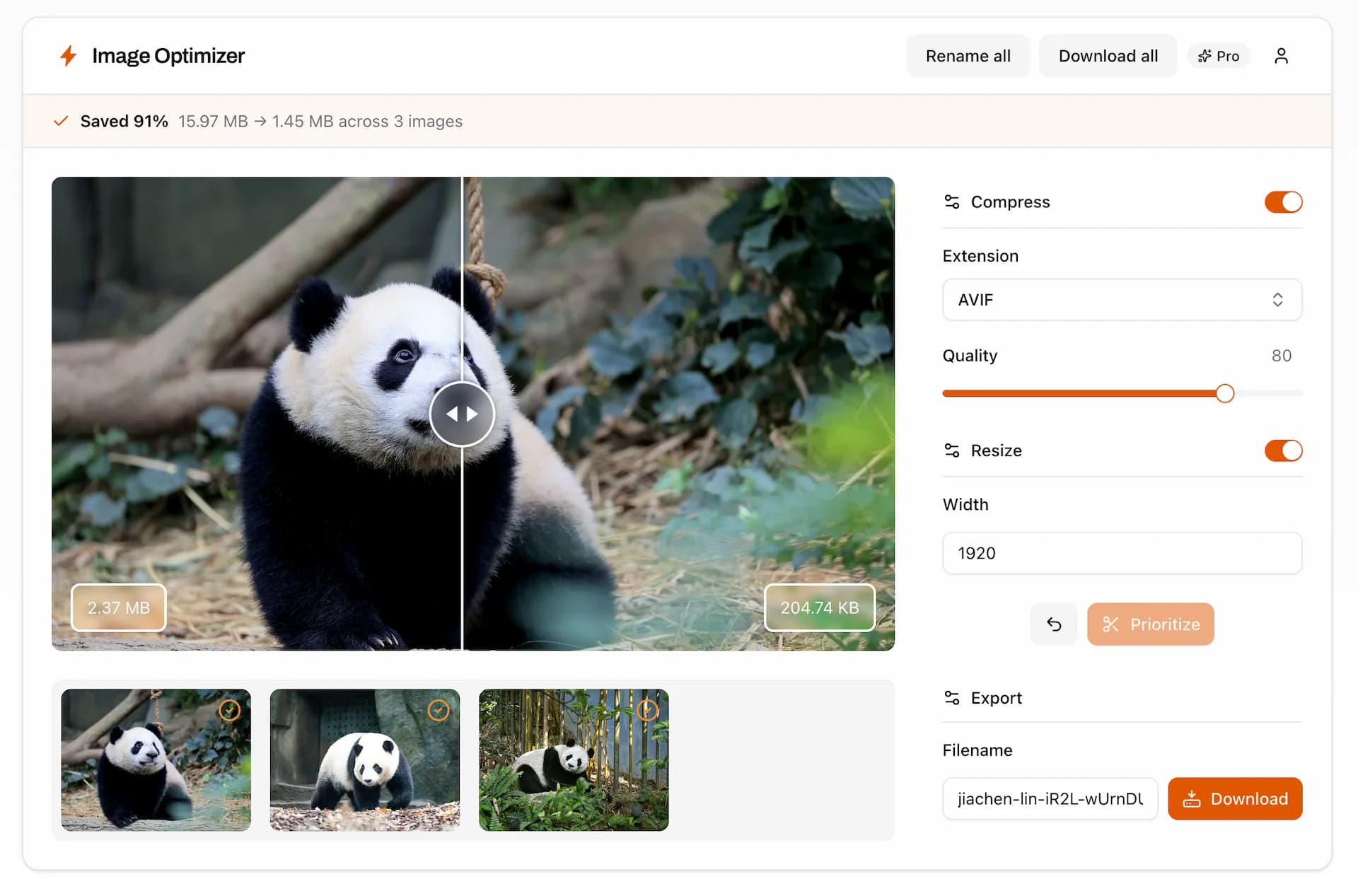
Step 3 — Download. Grab a single image (with the Download button), or take the whole batch. On Pro you can download everything as one .zip (with the Download all button) and even bulk-rename the set with a prefix and auto-numbering, so IMG_4471.jpg becomes product-01.avif, product-02.avif, and so on — compress, resize, rename, and package in a single pass.
How this compares to the usual tools
You've probably used TinyPNG, iLoveIMG, or Compressor.io. They work, but they add your images to their servers to do the compression, cap the free tier tightly, and nudge you toward a monthly subscription. Squoosh, Google's own tool, is genuinely private and excellent — but it's built for one image at a time, with no batch, no rename, and no zip.
Image Optimizer sits in the gap: as private as Squoosh (nothing is added to any server), but with the real batch workflow the server-based tools charge a subscription for. And when you want the extras, Pro is a one-time $19 — pay once, use forever, no recurring bill. (The first 10 customers pay $9.)
Frequently asked questions
Which is better, AVIF or WebP? AVIF produces smaller files and richer color; WebP has broader, longer-established support. For the smallest possible photos, AVIF wins. For a low-risk upgrade across an entire site, WebP is the safer default. Serving AVIF with a WebP fallback gives you both.
Is AVIF better than JPG? For the web, yes, in almost every case. AVIF typically produces a file around half the size of a JPEG at comparable quality, with better handling of gradients and color. JPEG's only real edge is that it's understood by literally everything, which is why it still makes a fine last-resort fallback.
Is WebP obsolete? Not at all. AVIF is more efficient, but WebP's near-universal support, faster encoding, and years of tooling maturity keep it very much alive. Plenty of sites use WebP as their primary format and are perfectly happy.
What are the disadvantages of WebP? It's less efficient than AVIF, it's limited to 8-bit color (so very smooth gradients can occasionally band), and it lacks HDR. For everyday web images, none of these usually matter — but if you're chasing the absolute smallest file or the richest color, they're the reasons to look at AVIF.
Do any browsers not support WebP or AVIF?
WebP is supported almost everywhere. AVIF is supported by every current major browser, with only some older versions missing it. A <picture> element with a fallback covers the small remainder automatically, so you never have to gamble.
Why do my images keep saving as WebP instead of JPG? That's usually a website serving images in WebP and your browser saving them in the format it received. If you need a JPEG or PNG back, you can add the WebP to a tool like Image Optimizer and export it in whichever format you want.
The takeaway
AVIF versus WebP isn't really a fight — it's a choice between "smallest possible" and "works everywhere," and both are big upgrades over the JPEGs and PNGs weighing your pages down. Pick AVIF for photo-heavy pages, WebP for a safe site-wide switch, or serve both and stop thinking about it.
Whichever you choose, the conversion shouldn't be the hard part. Try Image Optimizer free, right in your browser — drop in a batch, convert to WebP or AVIF, and watch the file sizes drop, with every image staying private on your own device. When you're ready for AVIF output, one-click .zip export, and bulk renaming, Pro is a single $19 payment. Pay once, use forever.